
SHAPE
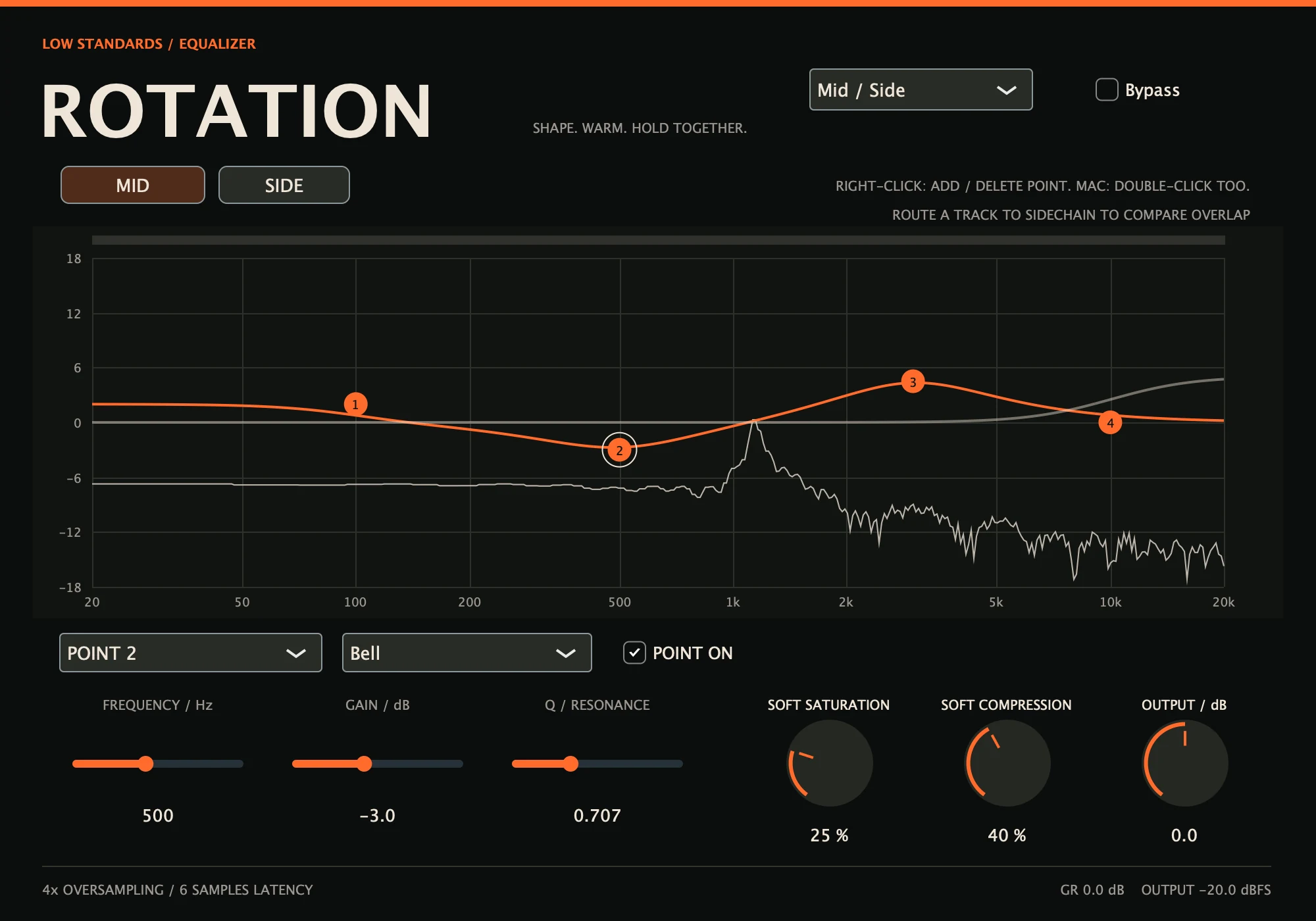
16 POINTS PER BANKBell, low/high shelf and high/low-pass filters. Right-click to add or delete; Mac also supports double-click. The left/right graph edges create high/low-pass points.
A familiar EQ curve with a little more underneath. Shape the center and sides independently, add soft saturation, and settle the dynamics.
Hear it in action ↓Coming soon. $40 for the individual plugin.
The same loop: original, EQ, then EQ with saturation and compression.
Choose a setting, then press play.
These demos are not loudness matched. Settings can change level as well as tone.
Playback could not start. Use the play button, or open the audio file.
Bell, low/high shelf and high/low-pass filters. Right-click to add or delete; Mac also supports double-click. The left/right graph edges create high/low-pass points.
Name your tracks in any Low Standards plugin or LS Link. Select a track under Compare track to see its spectrum and frequency overlap while you shape the EQ.
Add oversampled saturation and gentle stereo-linked compression. Match levels with Output and check the whole mix.
Built for your DAW.
Made by Low Standards.
Name this instrument below the EQ, then select another track from Compare track. Place LS Link on tracks without a Low Standards plugin and use the same Session name. Right-click to add or delete EQ points; Mac also supports double-click. Drag the points to shape the sound and listen in context. DAW sidechain comparison is also available.
No. The strip indicates simultaneous spectral energy, weighted by signal level. It is not a perceptual masking verdict and does not prescribe an EQ move. A grey strip means no connected/recent comparison data.
The bold curve is EQ gain. The thin traces show input, output and the selected comparison spectrum on a separate −90 to 0 dBFS display scale. With no linked source selected, comparison uses the DAW sidechain. The overlap strip is an energy comparison to help your decisions; it does not automatically unmask audio.
With gains at zero, no active pass filters, Saturation/Compression at zero and Output at unity, audio uses the original dry samples delayed by the reported oversampling latency.
The ratio rises to 2:1, with a −12 dB threshold, 6 dB knee, 20 ms attack and 120 ms release. There is no automatic makeup gain or brickwall limiter.
Development builds include Mac AU and VST3 for Apple Silicon and Intel, and Windows x64 VST3. Direct audio-engine and processor checks have passed. September 2026 development revision. Automated DSP/processor checks and isolated Mac AU/VST3 load checks passed. Native Windows and REAPER/Ableton testing, signing/notarization and final delivery checks remain before sale.
The individual plugin will be $40. Sales open after final release checks.
Individual plugin optionsYour purchase will include a serial for up to three active computers. Deactivate an old computer to free a slot. Connect once to activate your serial, then use the plugin offline—even after restarting your DAW. Internet is needed again only to activate another computer or deactivate a slot.
Checkout opens after final release checks.
Posteriori, Intellinut, The Clap, Pull Out, Rotation, Wav Spreader, Psychotic, BAG and WET.
$306 one-time purchase
$360 individually · Save $54 · 15% off
Every paid plugin in one bundle. LS Link is included free. Individual plugins are $40 each. Perpetual licenses; no subscription.
Bundle checkout opens after final release and delivery checks.
Enter an Instrument / track name below the controls. Low Standards plugin instances in the same DAW process share spectra and waveform analysis. Add the free LS Link companion to any other mixer track you want to see.
Use the same Session name on both tracks. In Rotation choose a Compare track to see its spectrum and overlap. In Pull Out choose a Kick waveform preview, then route the kick to the DAW sidechain separately if you want it to trigger ducking. Names and selections save with the project.
Track analysis stays on your computer and needs no network connection. LS Link passes the original samples unchanged with zero added latency. Separately bridged plugin processes cannot discover each other. Match session names to separate projects.